
Current as of 4 September 2026.
A walkthrough of the official service run by China's National Immigration Administration (NIA). Every screenshot comes from the live service; the fields are filled with demo data.
In brief
| What it is | The electronic Arrival Card. It replaces the paper form that used to be handed out on the plane |
| Since when | Online filing has been available since 20 November 2025 |
| Who fills it in | Foreigners entering mainland China, except 8 exempt categories (see step 2) |
| Where | Phone: https://s.nia.gov.cn/ArrivalCardFillingPhone/ · Desktop: https://s.nia.gov.cn/ArrivalCardFillingPC/ |
| Cost | Free. Any site charging a fee for this is a middleman |
| Languages | 13; the service follows your browser language and falls back to English |
| How long it takes | 5–10 minutes with your documents at hand |
| When to do it | The date of entry can only be set within the next 3 months. A day or two before departure works best |
| What you end up with | A receipt with a QR code: download it and email it to yourself |
| Missed it? | Fill it in on arrival — by QR code, at a self-service terminal, or on paper |
What to have ready
- Your passport. You will need a photo of the data page: jpg or png, no larger than 100 KB. A normal phone photo is 20–50 times heavier, so compress it first.
- The flight number you are crossing the Chinese border on.
- Your date of entry.
- The airport or port of entry — Beijing has two airports, and they are on opposite sides of the city.
- The full address of your first place of stay: street, building number, district. A hotel name alone is not enough.
- Phone number and email.
- Visa number — if you are travelling on a visa.
Step 1. Open the official service
The official web addresses:
- phone —
https://s.nia.gov.cn/ArrivalCardFillingPhone/ - desktop —
https://s.nia.gov.cn/ArrivalCardFillingPC/
Besides the website, NIA has other official channels: the "12367" app, the WeChat and Alipay mini-programs, and the QR code at the entrance to the border inspection area.
Filing is free. Sites that charge "processing fees" for the arrival card have nothing to do with the immigration authority — they simply retype your data into this same form.
The phone version is more convenient: the QR-code receipt saves straight to your camera roll.
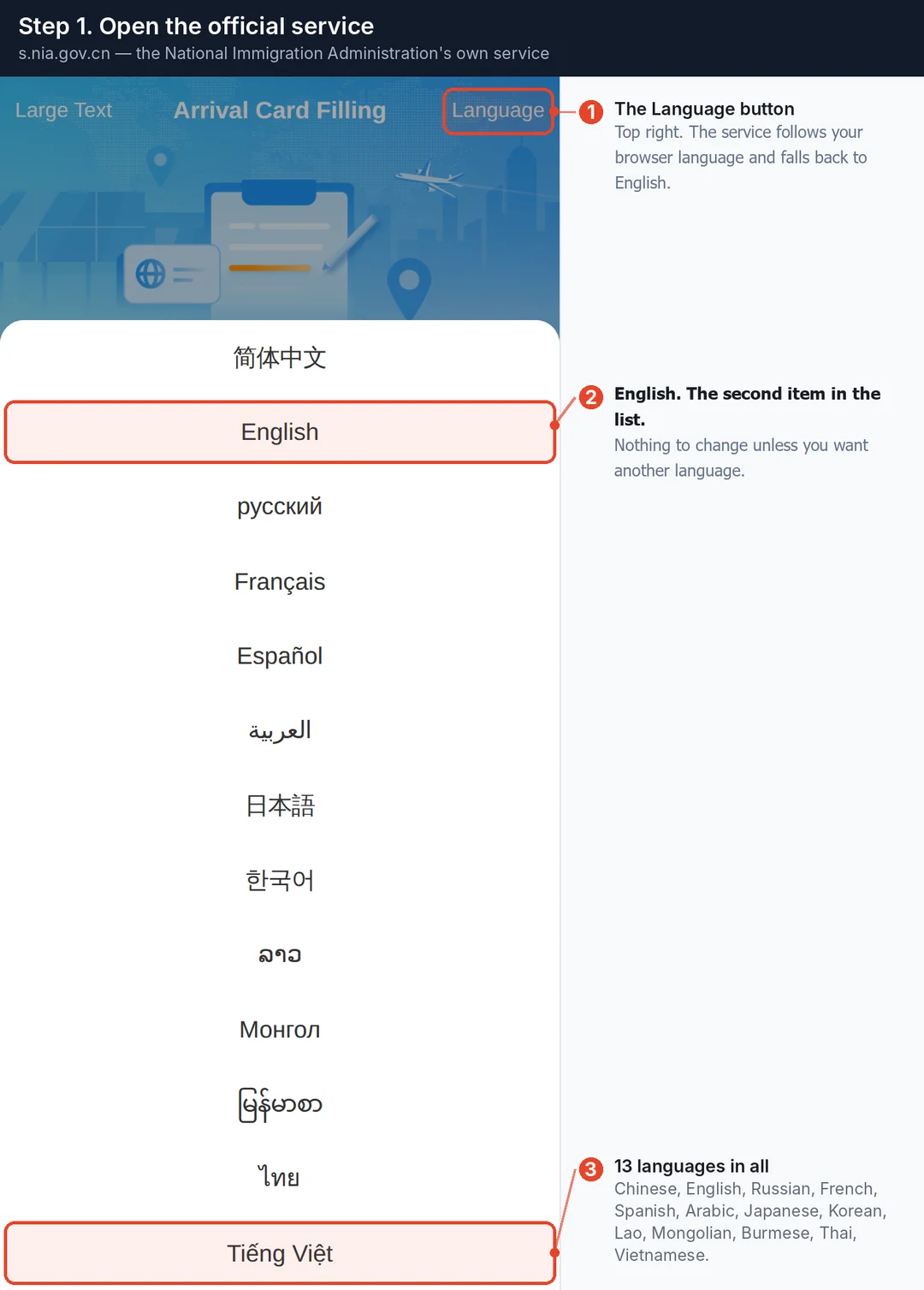
The service follows your browser or phone language and falls back to English. If it opens in the wrong one, the Language button in the top right offers 13, including Chinese, Russian, French, Spanish, Arabic, Japanese, Korean, Thai and Vietnamese.
Step 2. Choose "Entry Declaration" and read the rules
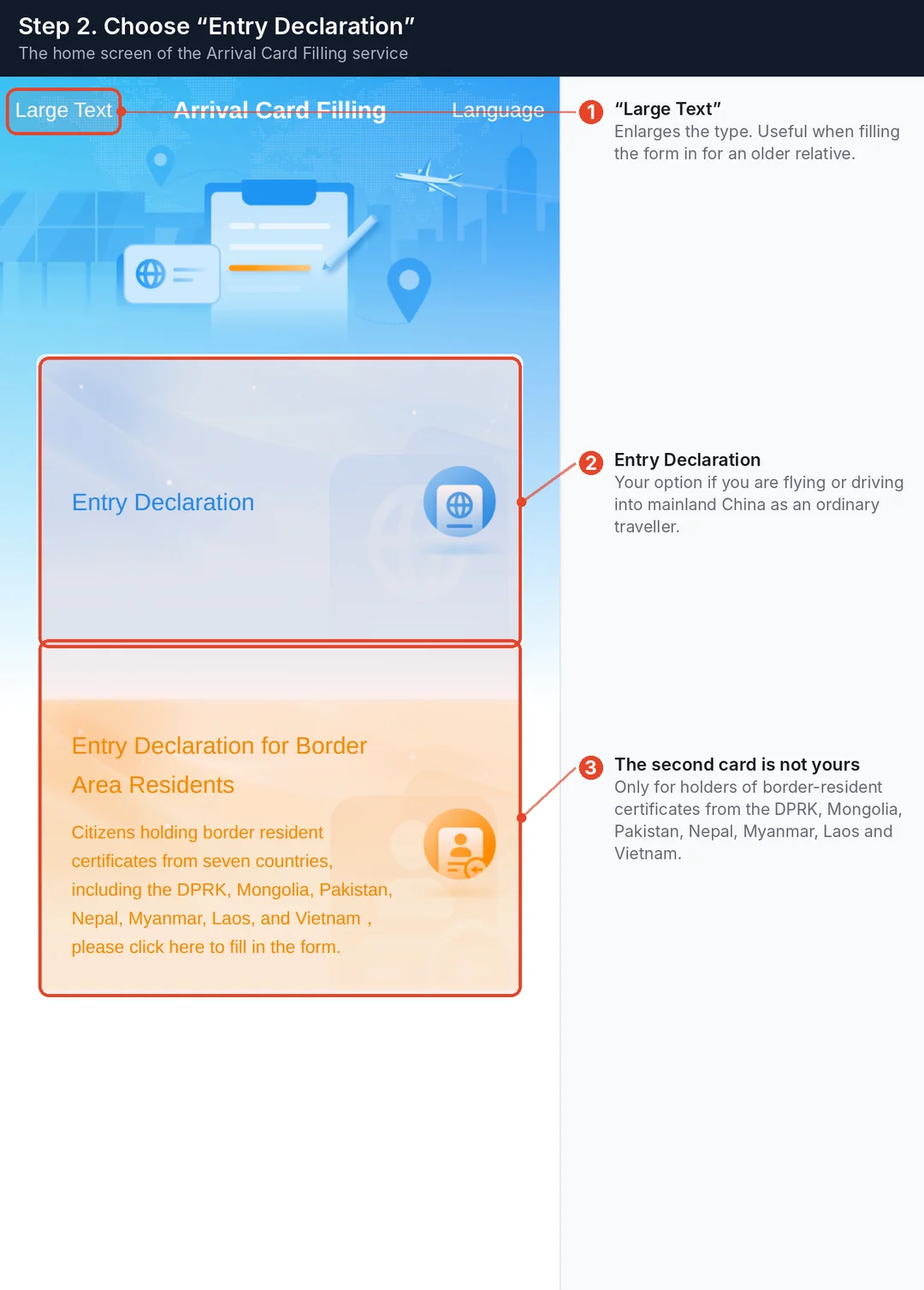
There are two cards on the home screen. Yours is the top one, Entry Declaration. The lower one is only for holders of border-resident certificates from the DPRK, Mongolia, Pakistan, Nepal, Myanmar, Laos and Vietnam.
Who does not need the card
The official list of 8 exempt categories (the NIA notice and embassy pages give 7 — they do not single out centralized document submission):
- Foreigners with a valid Foreign Permanent Resident ID Card of the People's Republic of China.
- Foreigners with a valid Mainland Travel Permit for Hong Kong and Macao Residents (non-Chinese).
- Foreigners transiting directly within 24 hours without leaving the restricted area of the port.
- Members of foreign tourist groups who are visa-free or holding a group visa.
- Foreign crew members, drivers and other employees of transport vehicles.
- Foreigners who enter by cruise ship and return with the original cruise.
- Individuals eligible for the courteous treatment of centralized submission of entry and exit documents.
- Foreigners who enter through the E-channel.
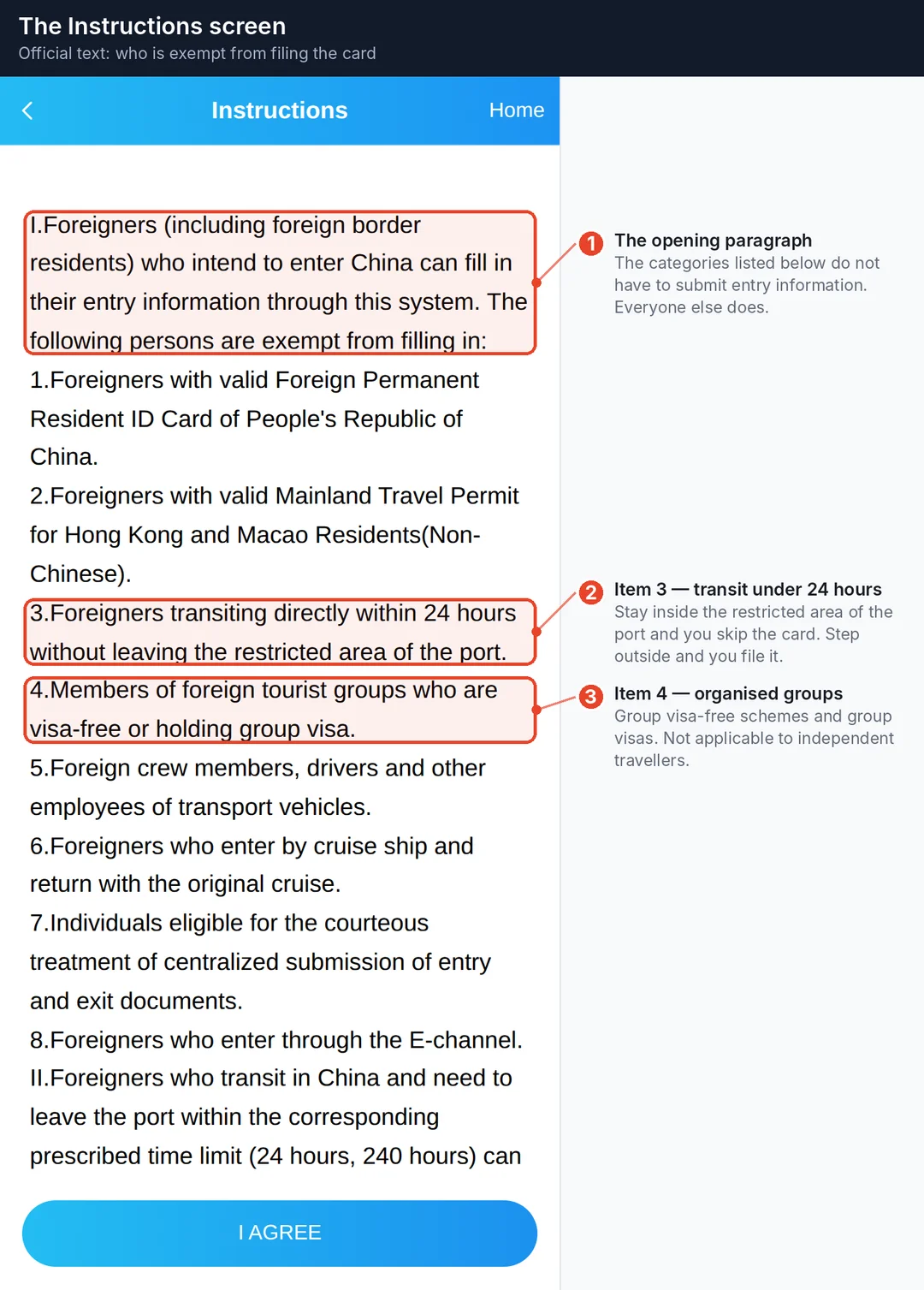
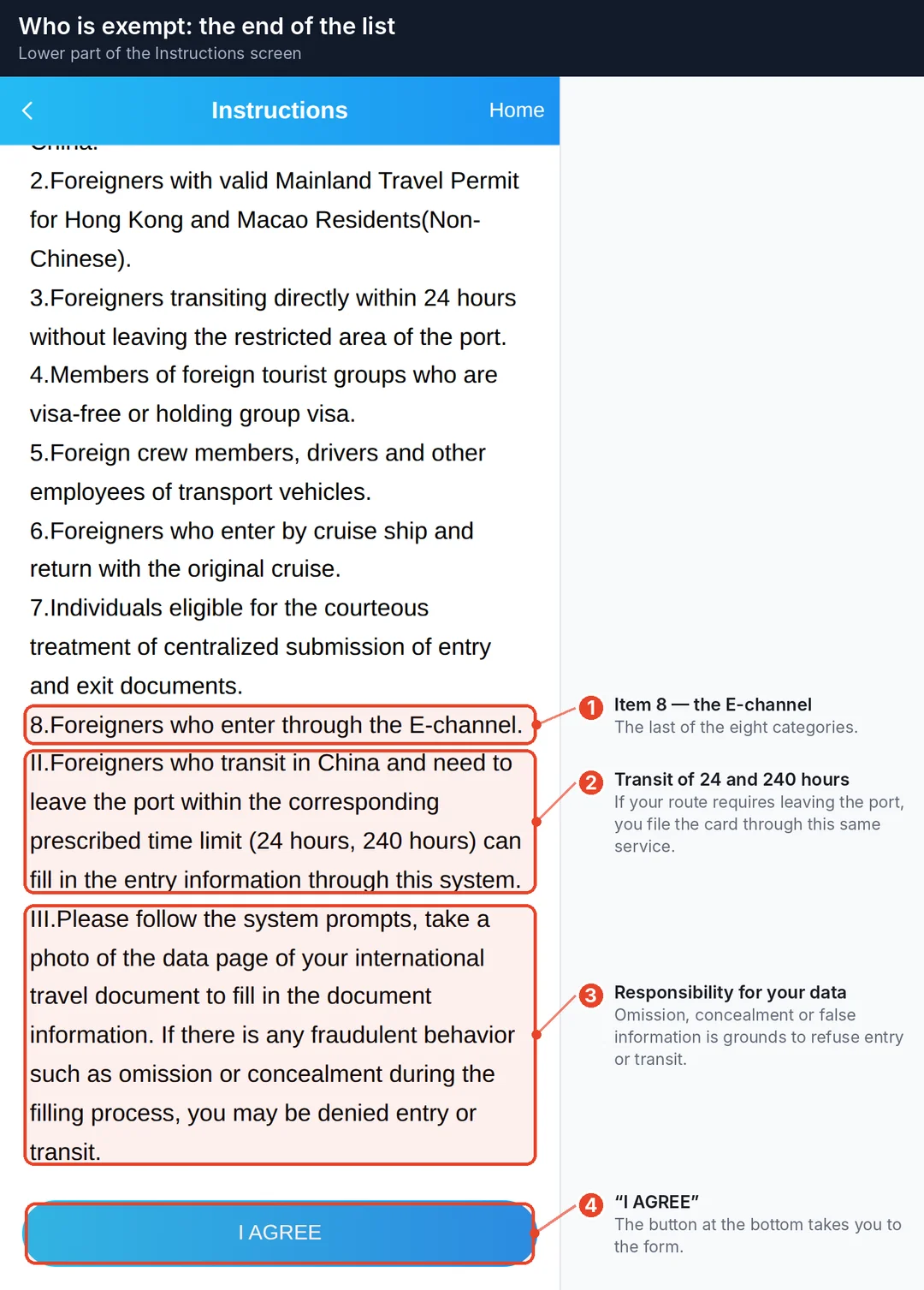
Transit passengers under the 24-hour and 240-hour schemes who need to leave the port do fill the card in.
If you are an ordinary traveller, assume you need it. Tap I AGREE at the bottom.
Step 3. Document type and passport photo
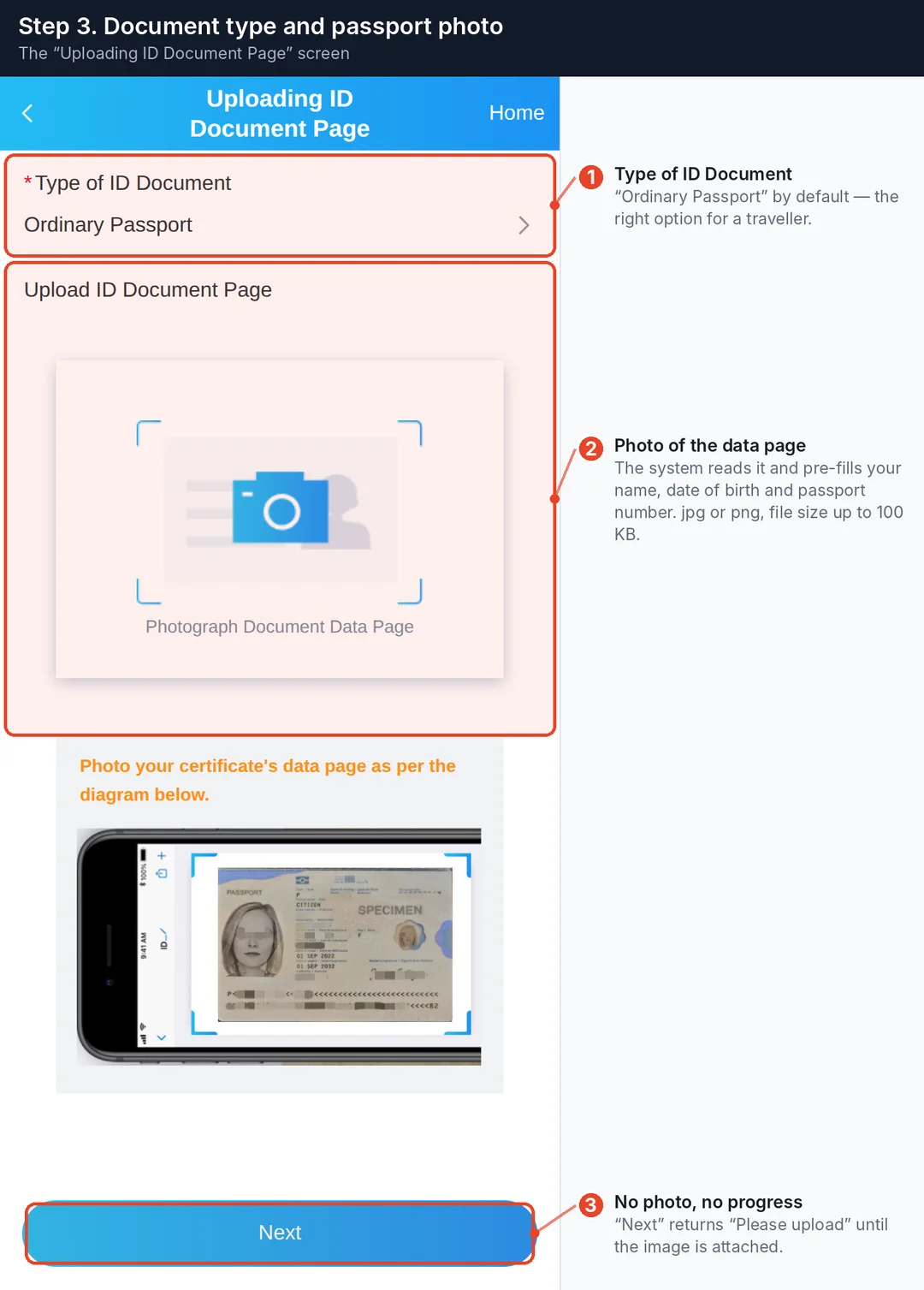
The service reads the photo of your data page and pre-fills your last name, first name, date of birth and passport number. Check the result anyway — OCR makes mistakes.
The technical trap: the form asks you to stay under 100 KB (the actual check trips at 150 KB), so aim for 100. jpg or png only. Compress the photo before you start.
Without a photo, Next returns "Please upload".
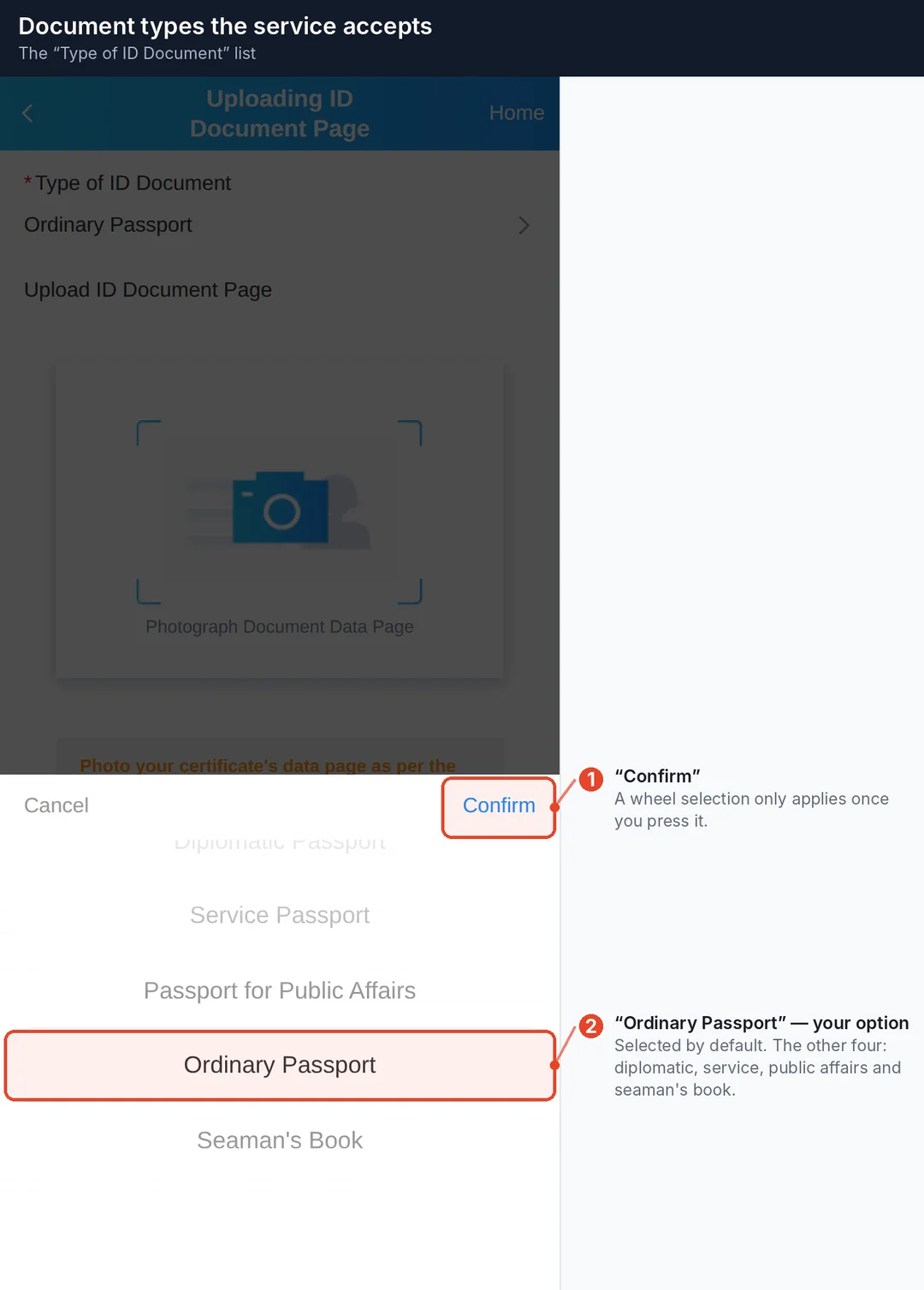
Five document types: diplomatic passport, service passport, passport for public affairs, ordinary passport, seaman's book. For a traveller it is Ordinary Passport, which is already selected.
Step 4. Basic Information
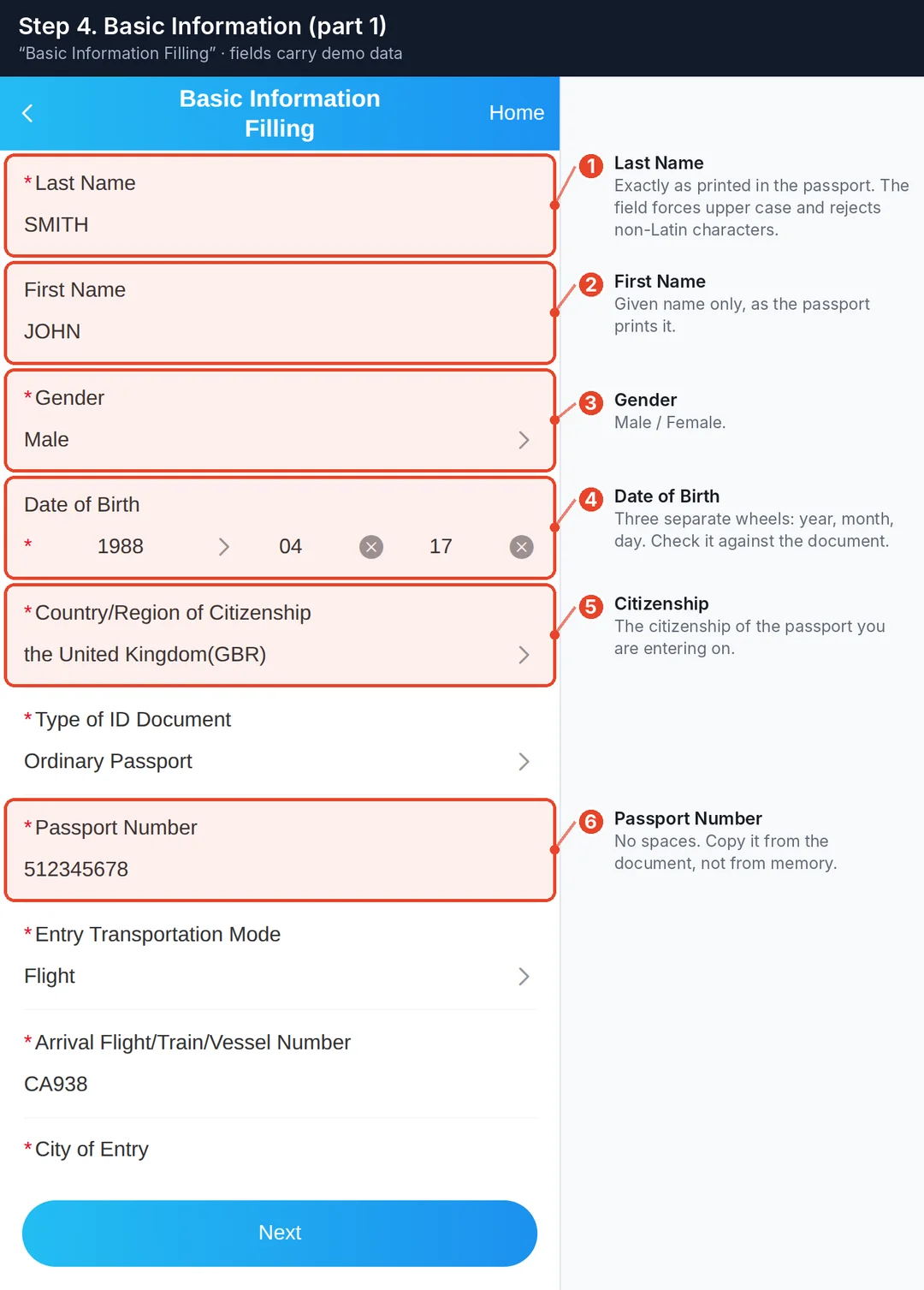
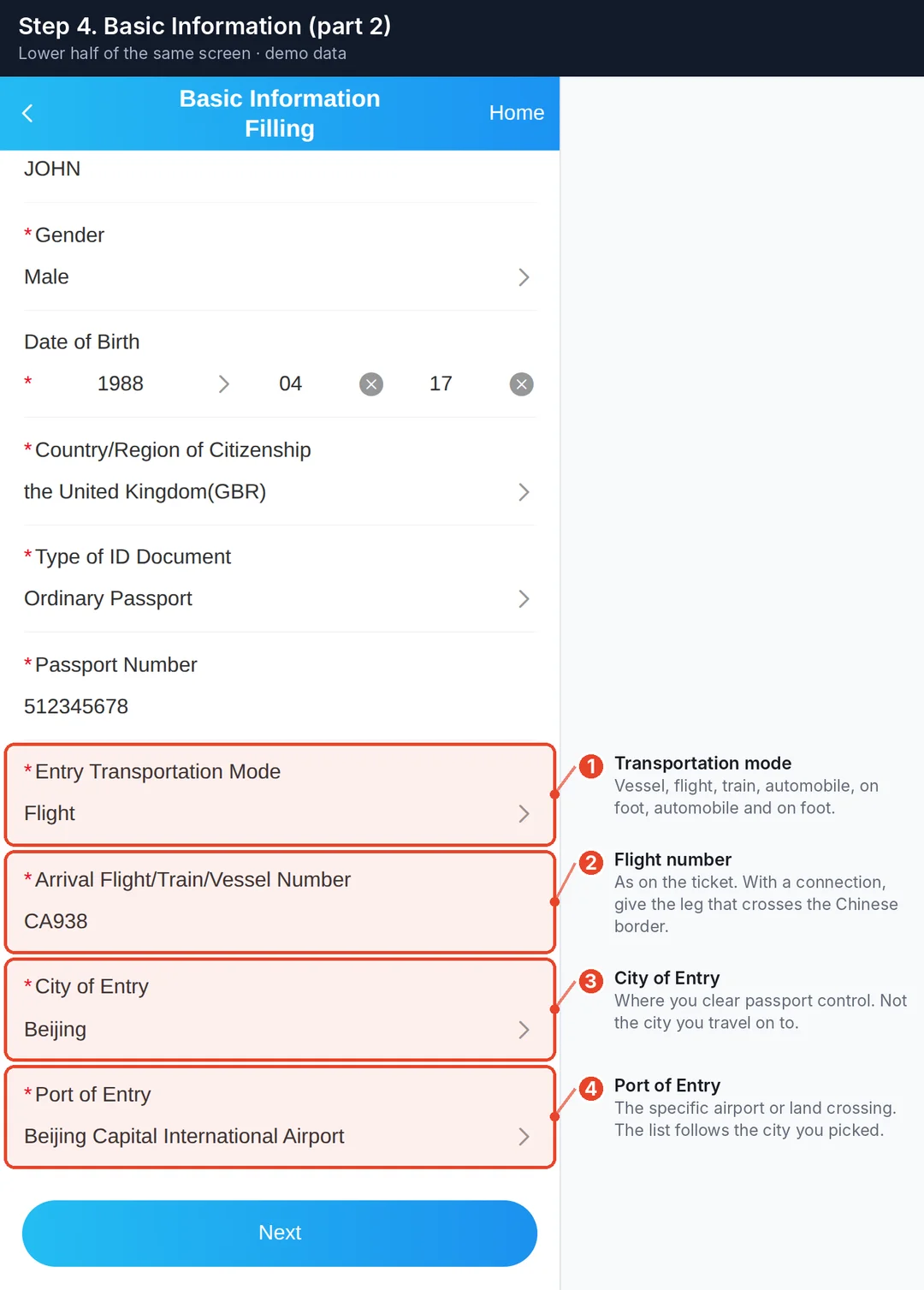
Fields marked with an asterisk are required. What matters:
- Last Name and First Name — exactly as printed in your passport. The field forces upper case and rejects non-Latin characters.
- Date of Birth — three separate wheels: year, month, day.
- Country/Region of Citizenship — the citizenship of the passport you are entering on.
- Passport Number — no spaces.
- Arrival Flight/Train/Vessel Number — with a connection, give the leg that actually crosses the Chinese border, not the first flight of your trip.
- City of Entry — where you clear passport control, not where you are heading afterwards.
Choosing your citizenship
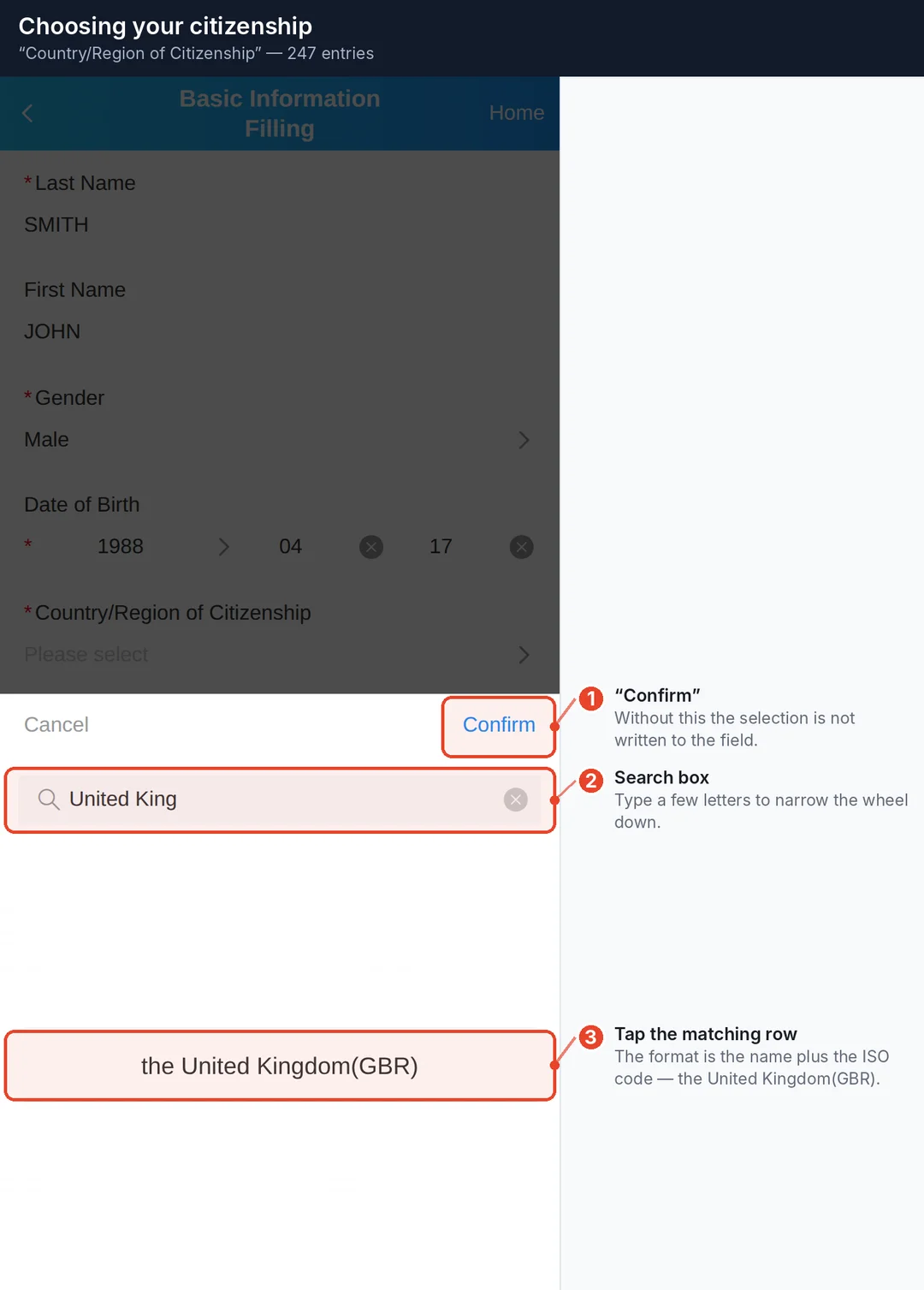
247 countries and regions. The search box narrows the wheel down instantly; the entry format is the name plus the ISO code, for example the United Kingdom(GBR).
Whatever you pick, press Confirm — otherwise the value is not written to the field. That applies to every wheel in this form.
City and port of entry
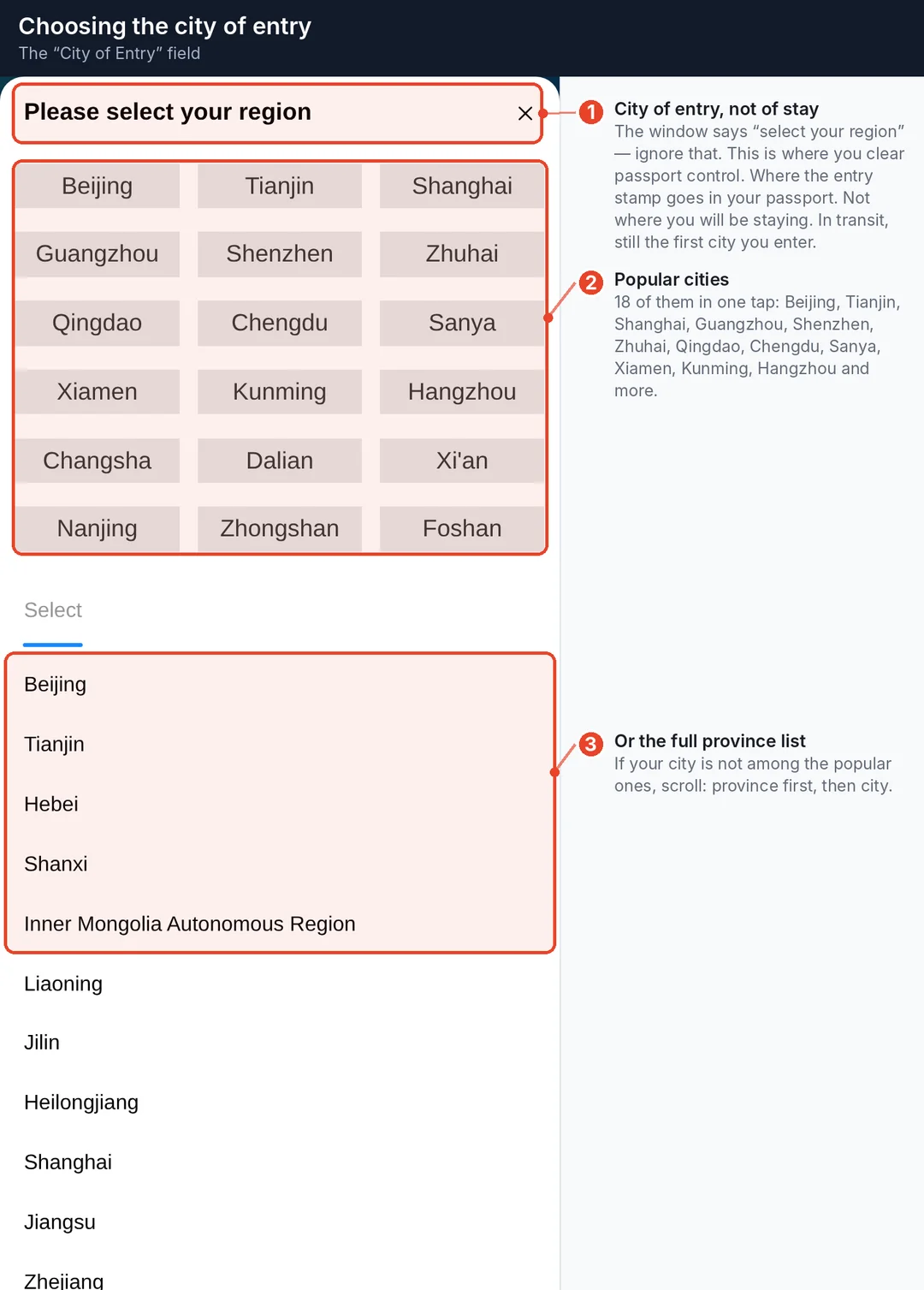
Popular cities sit at the top — Beijing, Shanghai, Guangzhou, Shenzhen, Sanya, Chengdu, Xiamen, Kunming, Hangzhou and others. Below them is the full list of provinces.
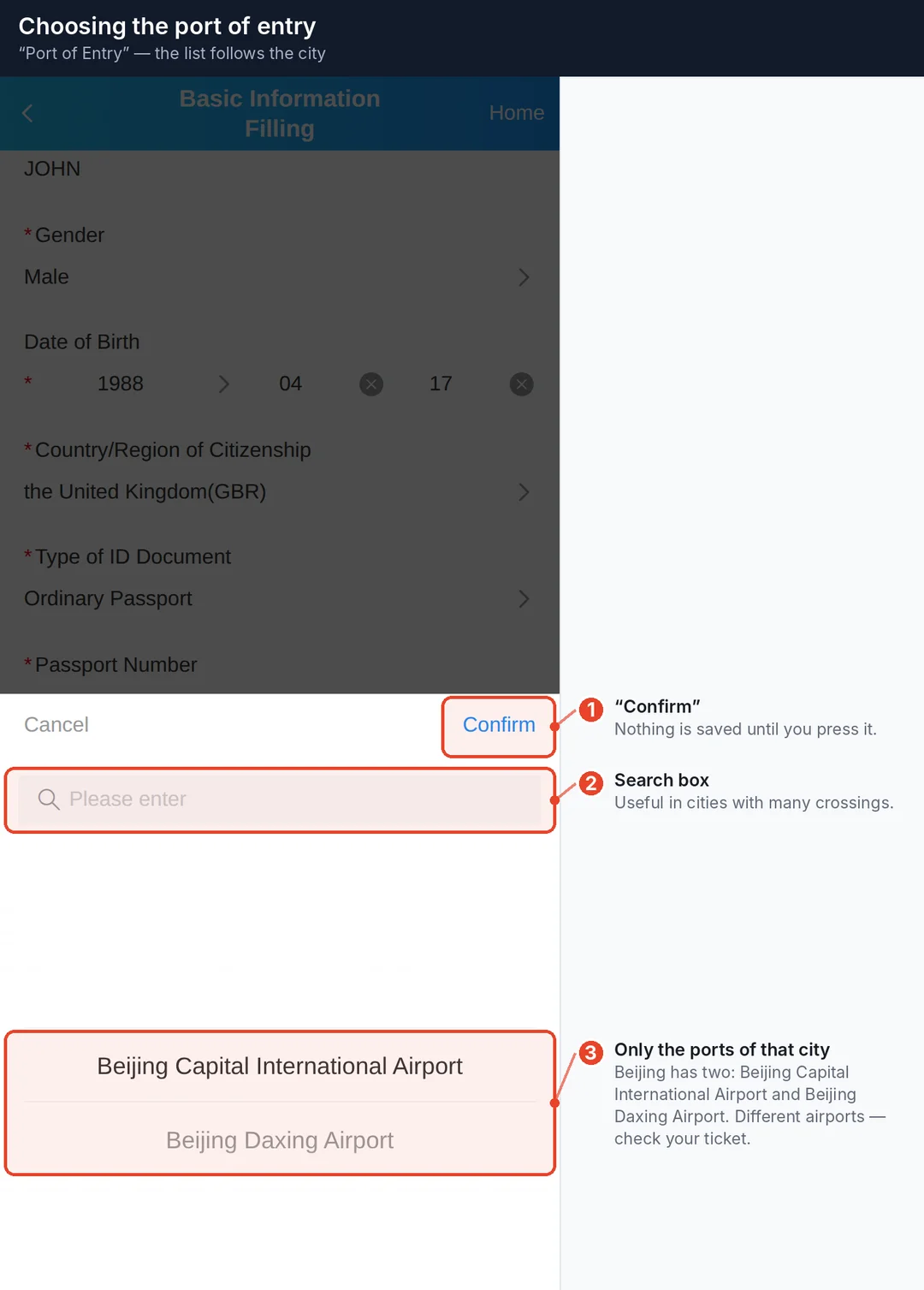
The port list depends on the city you picked. Beijing has two: Beijing Capital International Airport and Beijing Daxing Airport — different airports on different sides of the city, so check your ticket.
Naming is not consistent across the list: some entries are full airport names, others are just the district — Shanghai gives you Pudong and Hongqiao, Guangzhou Baiyun. Match it to the airport code on your ticket.
Step 5. Personal Information
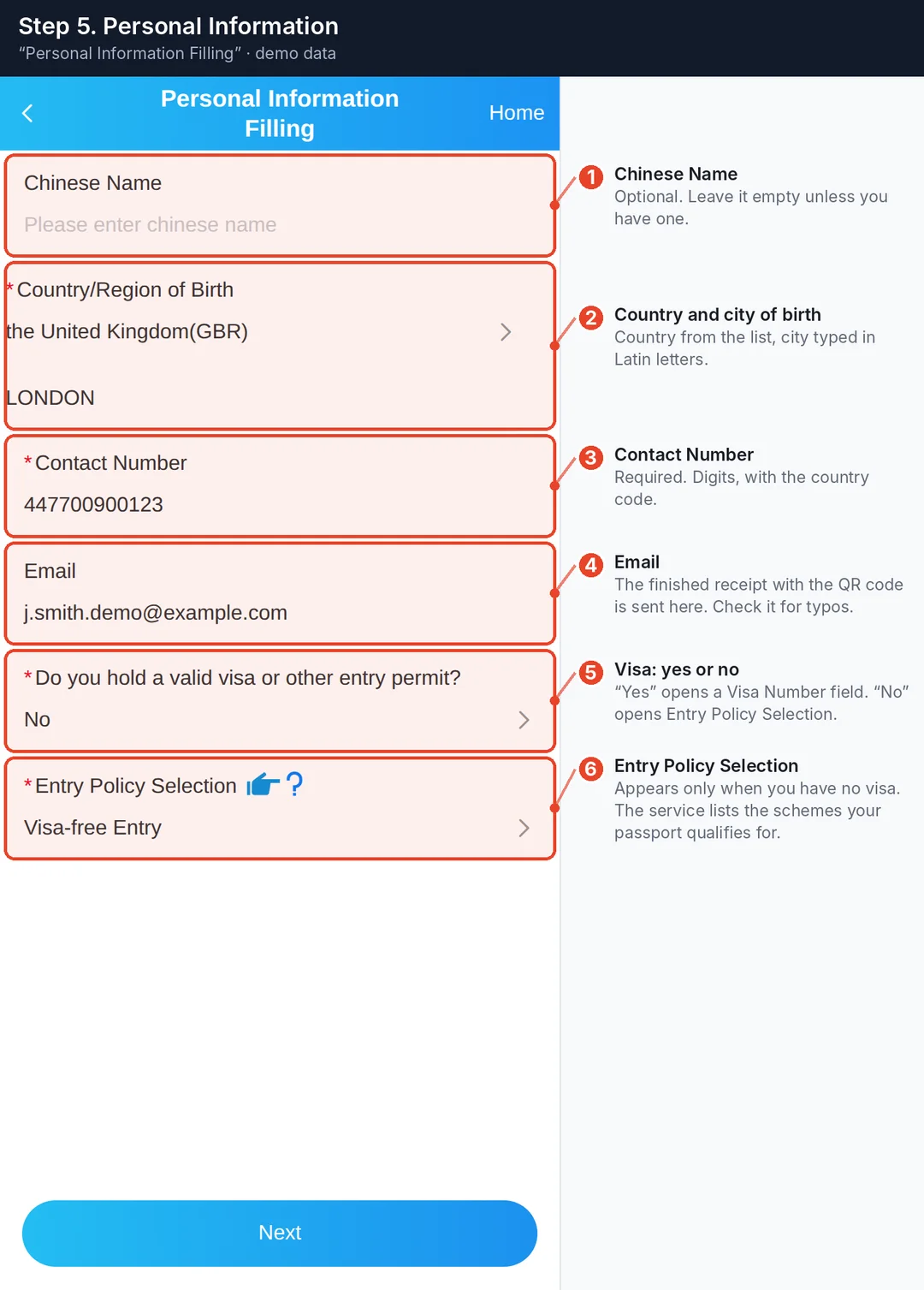
- Chinese Name — optional. Leave it empty unless you have one.
- Country/Region of Birth — country from the list, city typed in Latin letters.
- Contact Number — required. Digits, with the country code.
- Email — formally optional, but this is where the finished receipt is sent. Fill it in and check it for typos.
The visa question is the fork in the road
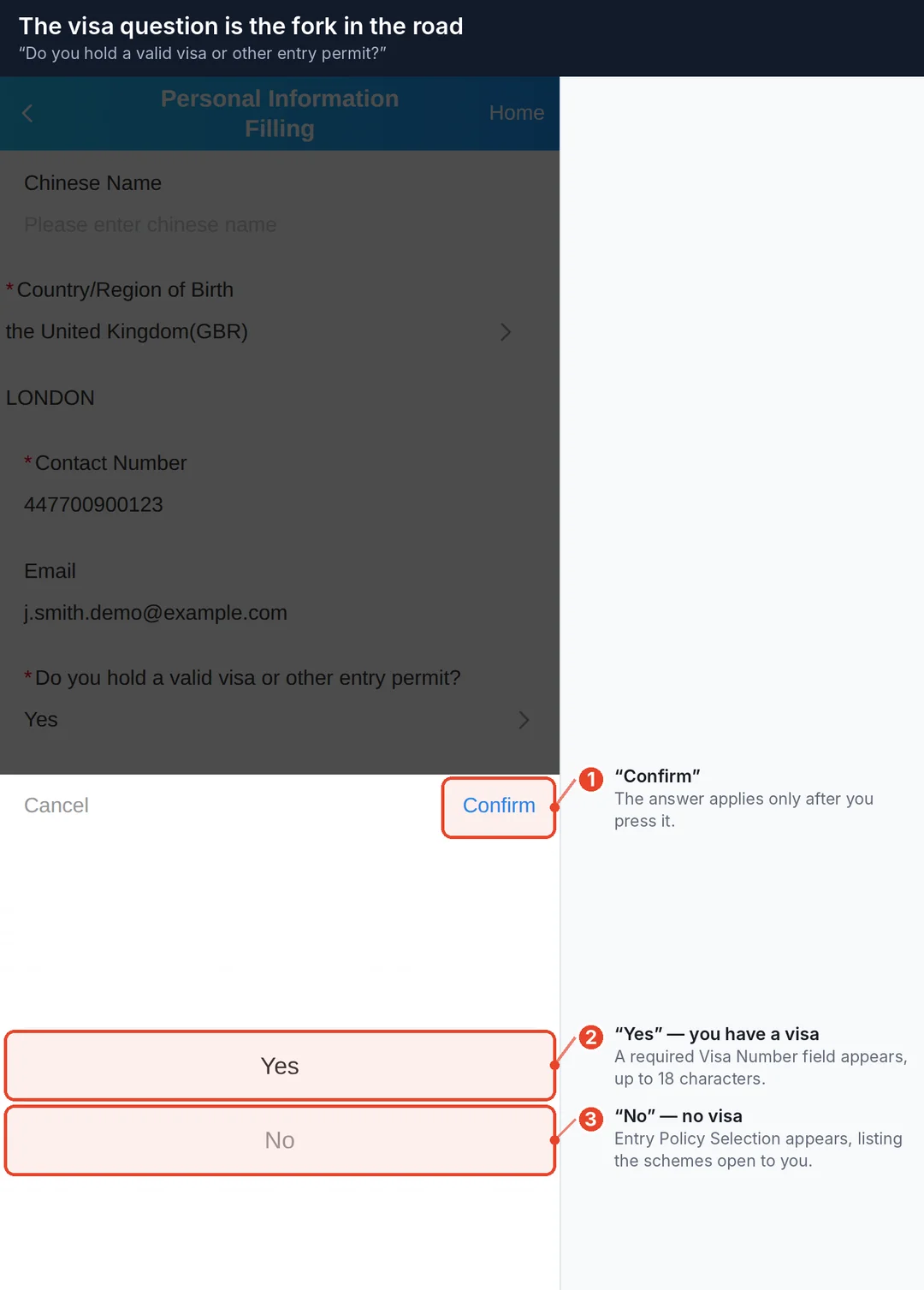
- Yes — a required Visa Number field appears (up to 18 characters, exactly as on the visa sticker).
- No — an Entry Policy Selection field appears.
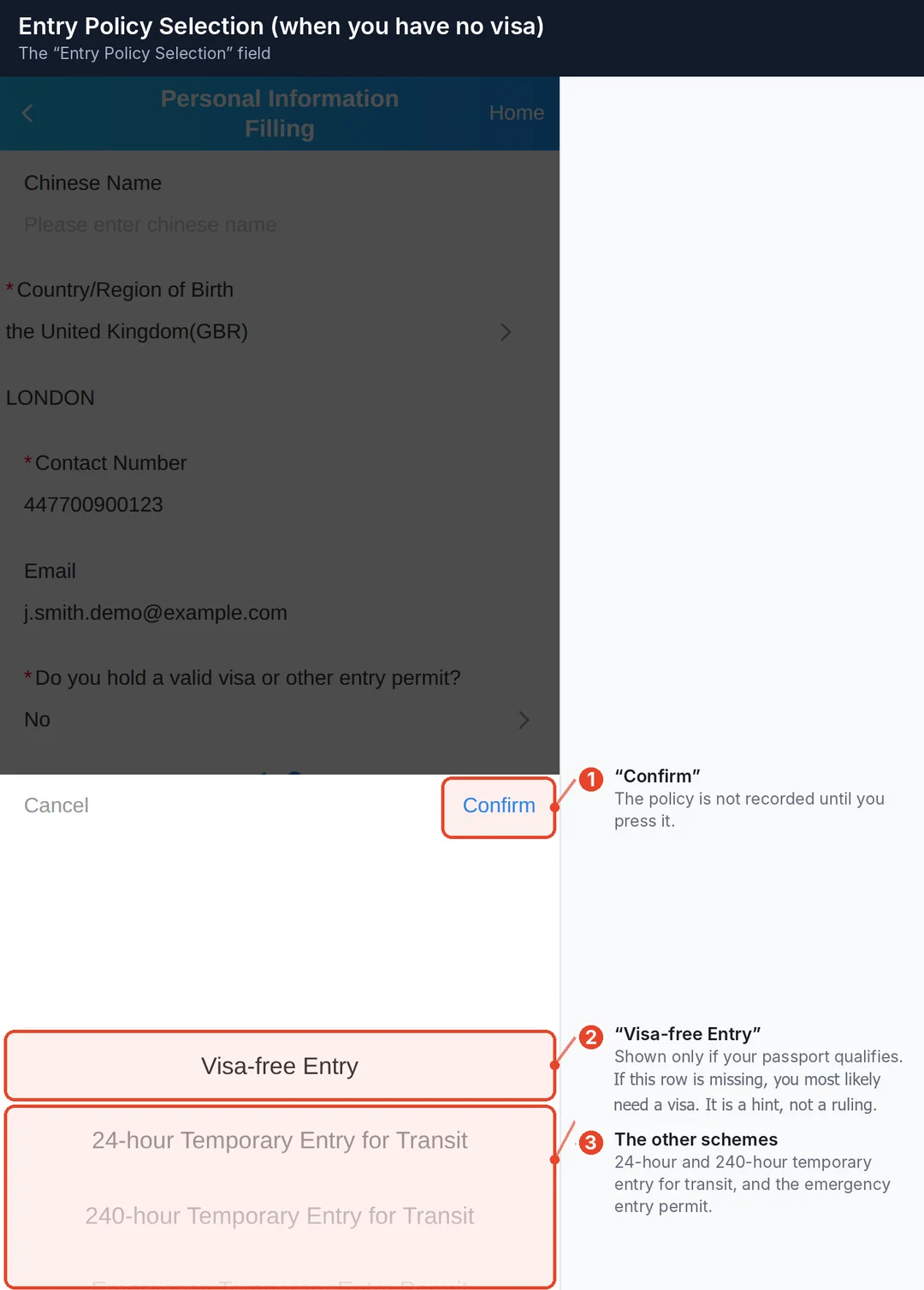
This screen lists only the policies your passport actually qualifies for. For a UK passport that is visa-free entry, 24-hour transit, 240-hour transit and the emergency entry permit.
It is a quick way to check your own status: no "Visa-free Entry" on the list, and your passport most likely does not qualify, so you need a visa. But the list is the system's hint — "you may be eligible" — not a legal ruling: the final call belongs to the officer at the border. Check an official source before you travel.
Step 6. Travel Information
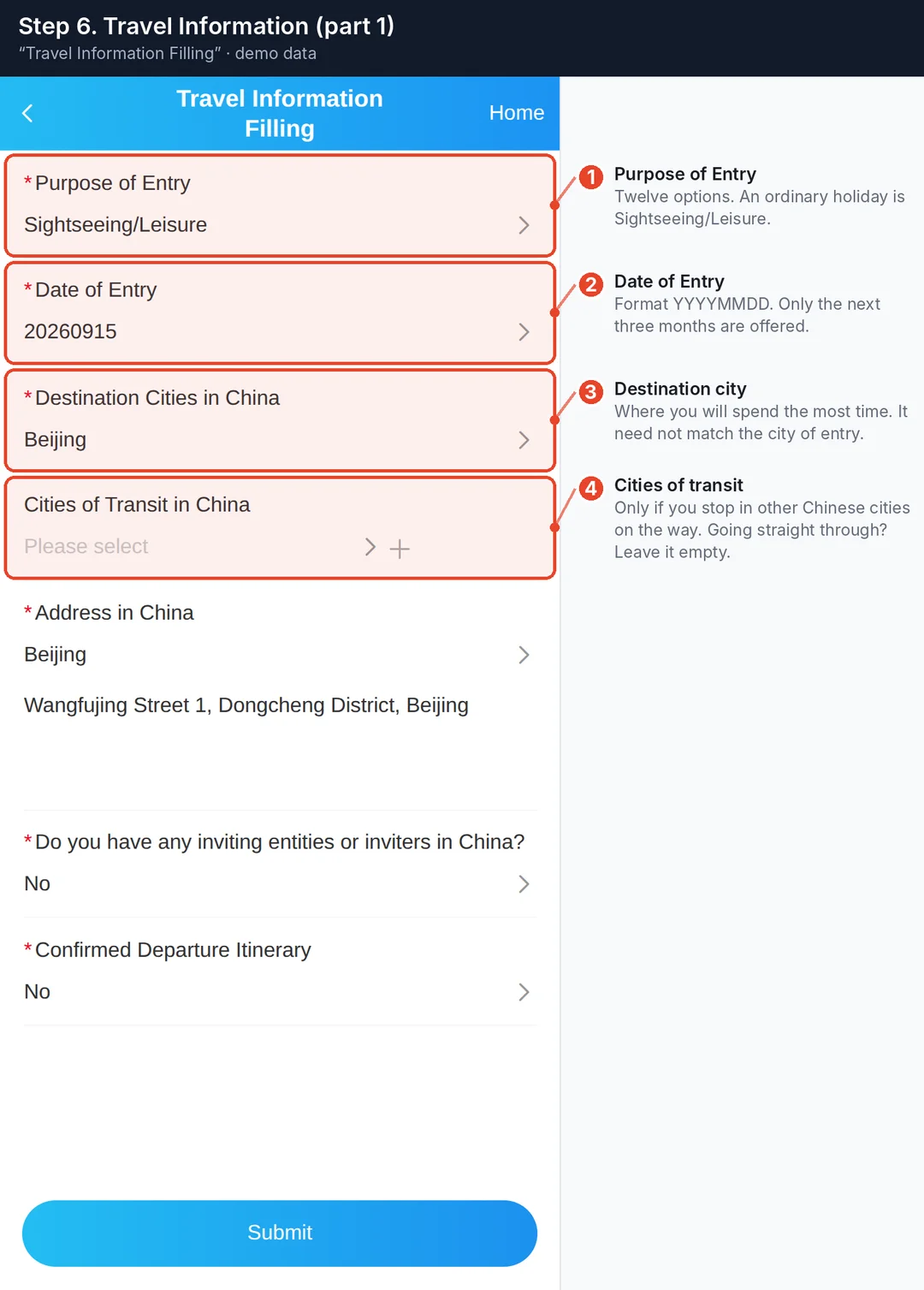
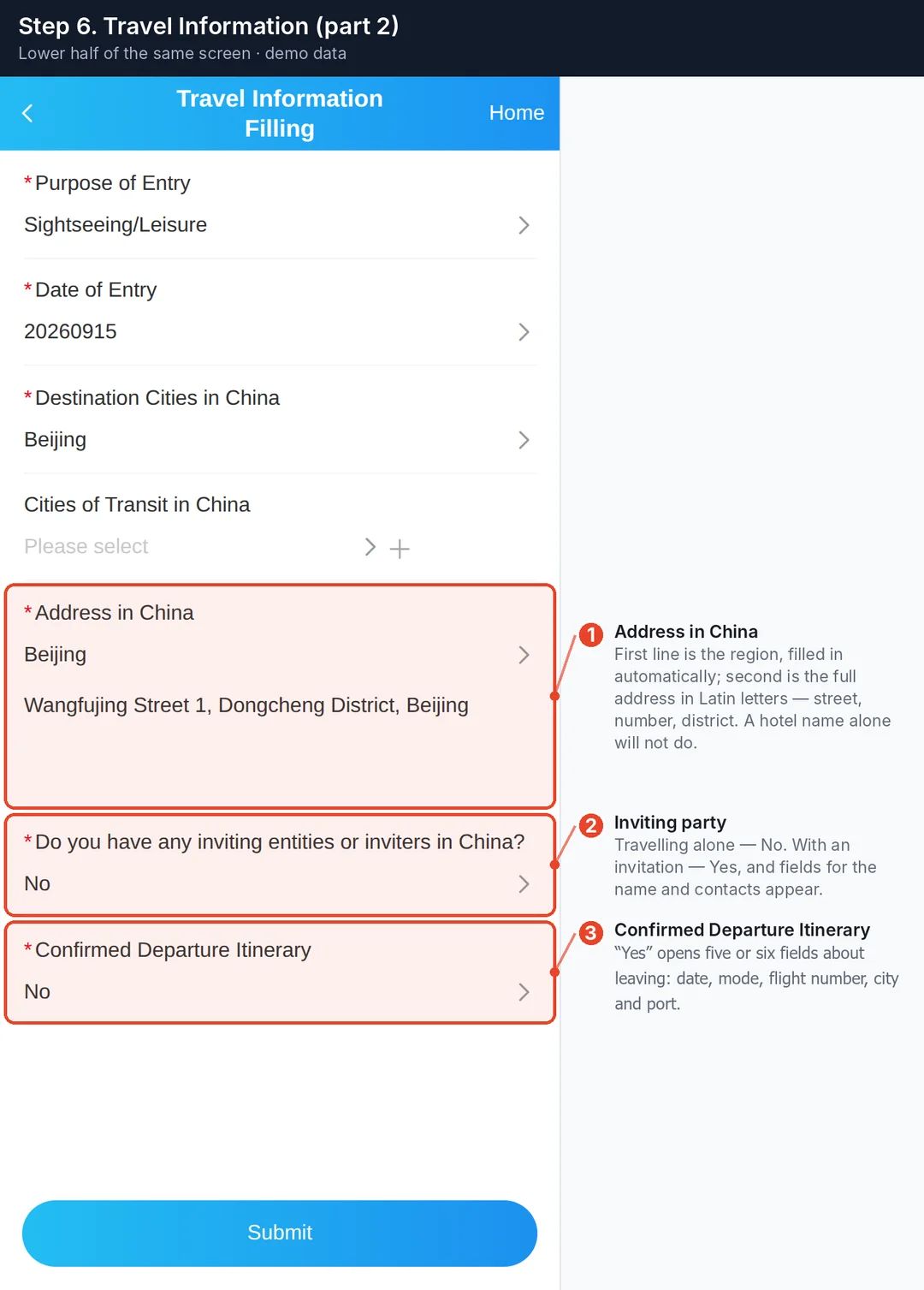
Purpose of Entry
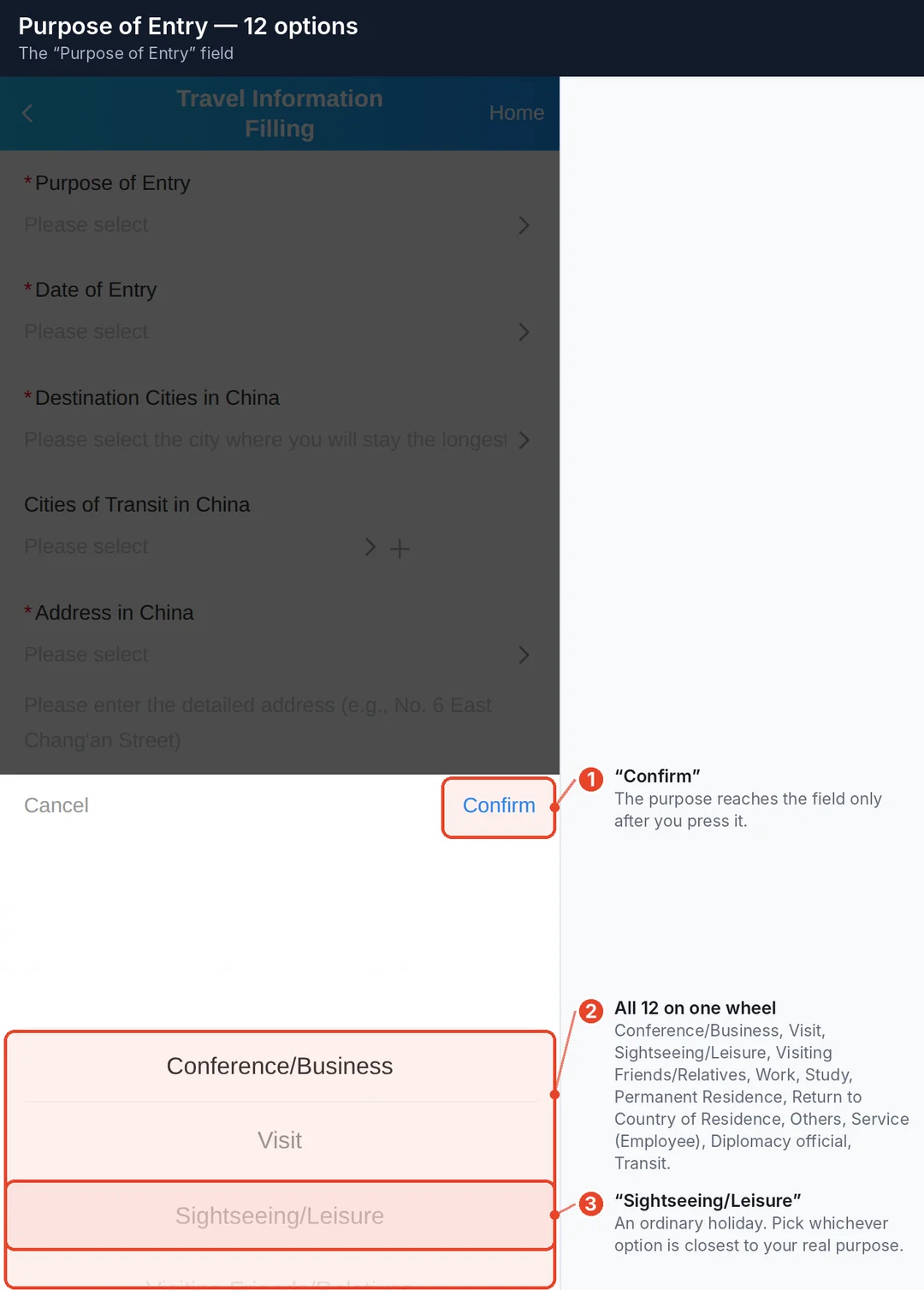
Twelve options: Conference/Business • Visit • Sightseeing/Leisure • Visiting Friends/Relatives • Work • Study • Permanent Residence • Return to Country of Residence • Others • Service (Employee) • Diplomacy official • Transit.
Pick the one that matches your actual trip. An ordinary holiday is Sightseeing/Leisure.
Date of Entry
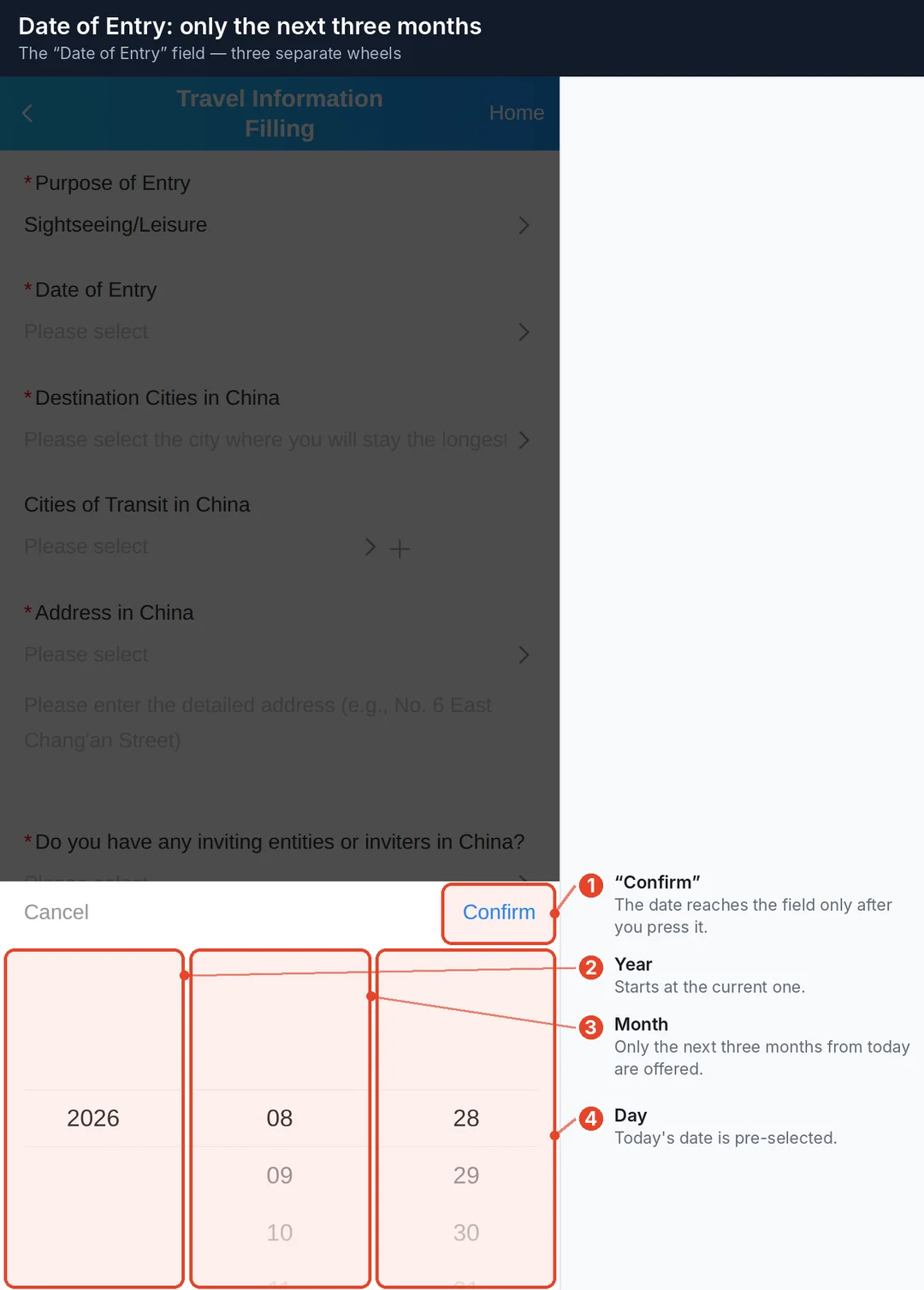
The wheel starts today and ends exactly three months out. Filling the card in further ahead than that is simply not possible — the form will not offer the date.
Address in China
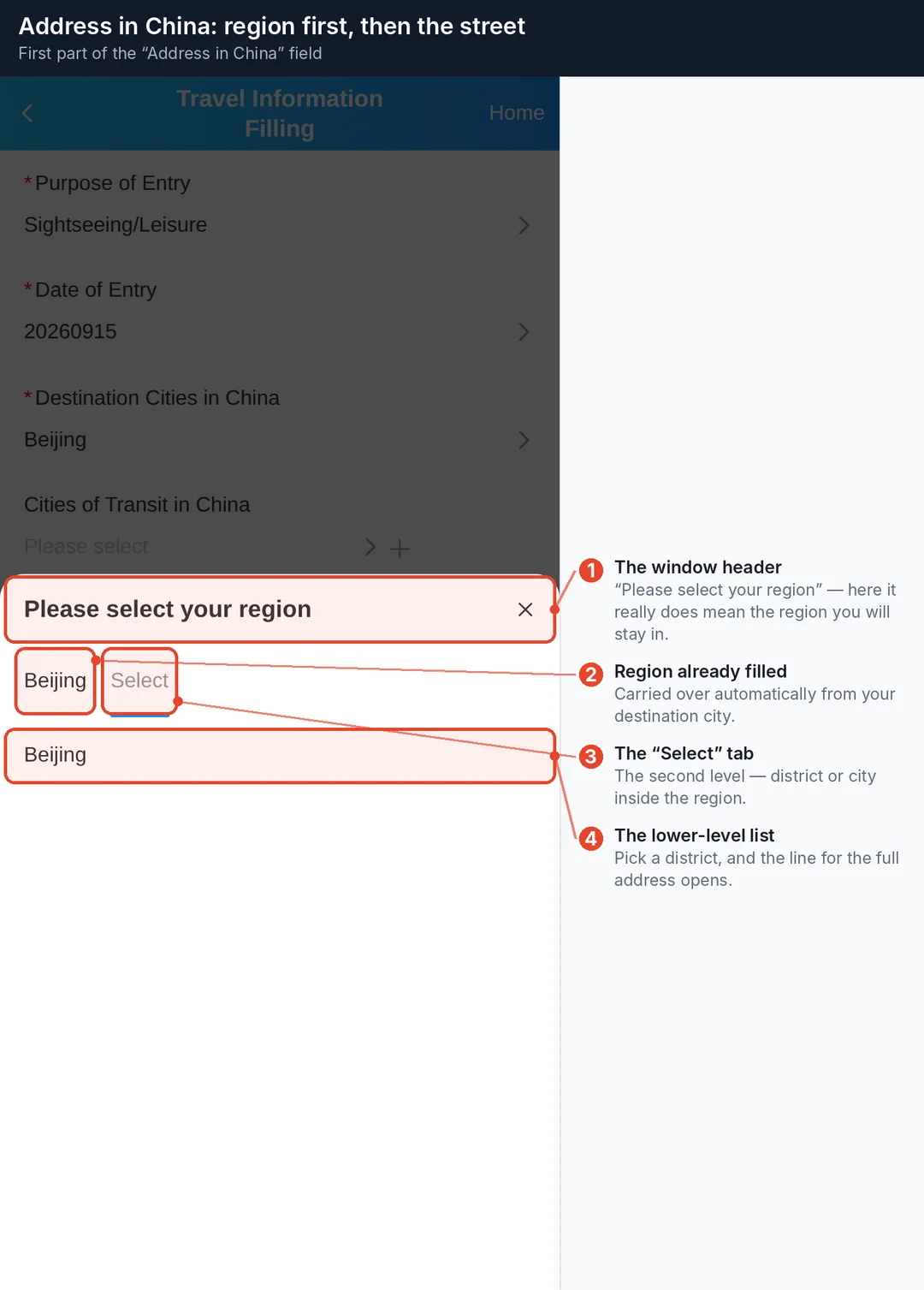
The field has two parts: a region, filled in automatically from your destination city, and a line for the full address in Latin letters. The form's own hint reads Please enter the detailed address (e.g., No. 6 East Chang'an Street).
Copy it from your booking confirmation — it is usually already written out in English there.
Inviting party and itinerary
- Do you have any inviting entities or inviters in China? — travelling on your own, answer No. With an invitation, answer Yes and fill in the entity or person's name and contact details.
- Confirmed Departure Itinerary — Yes opens five or six more fields about your departure.
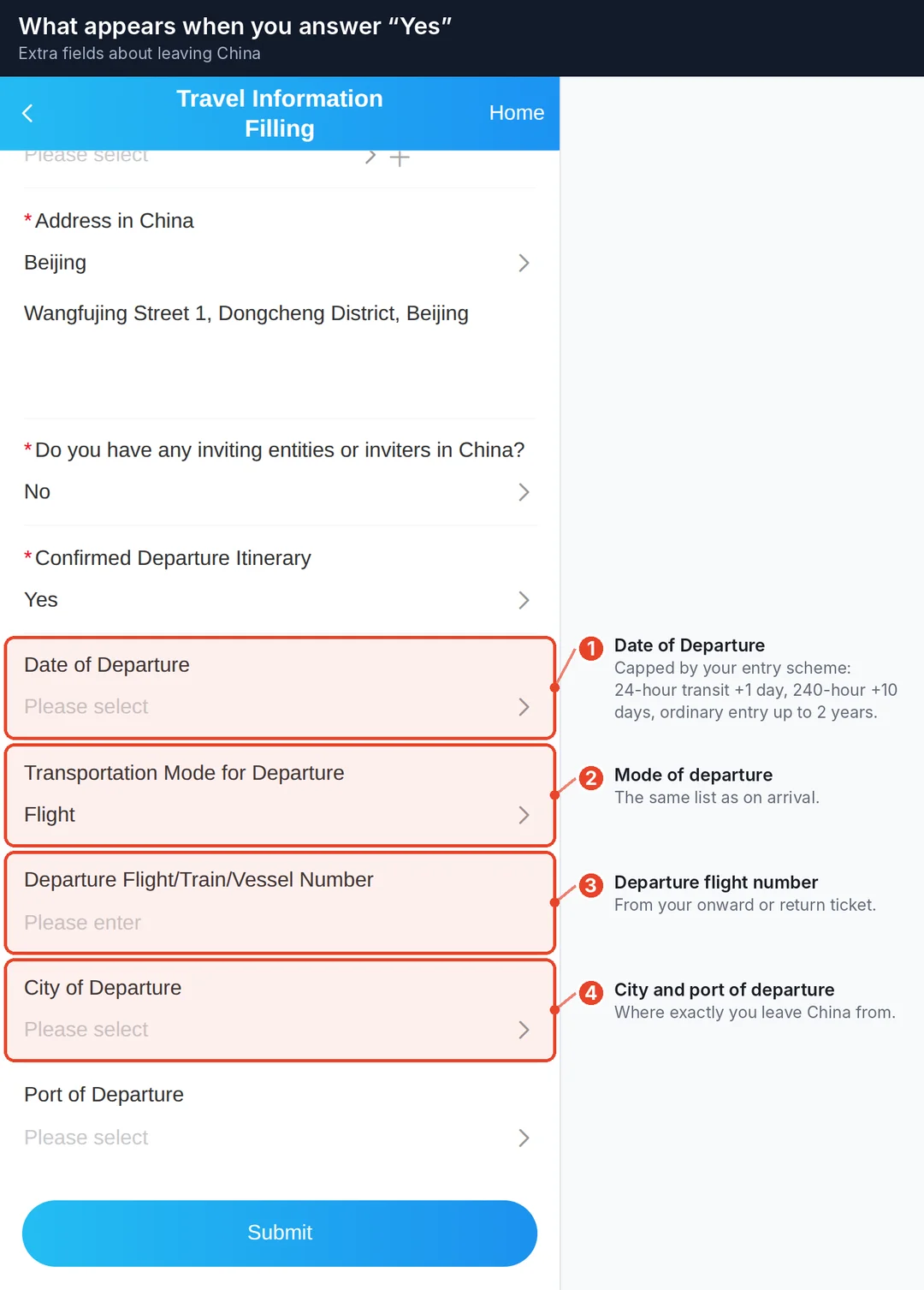
The departure date is capped by your entry policy: 24-hour transit gives +1 day, 240-hour transit +10 days, an ordinary entry up to 2 years.
Step 7. Submit and receipt
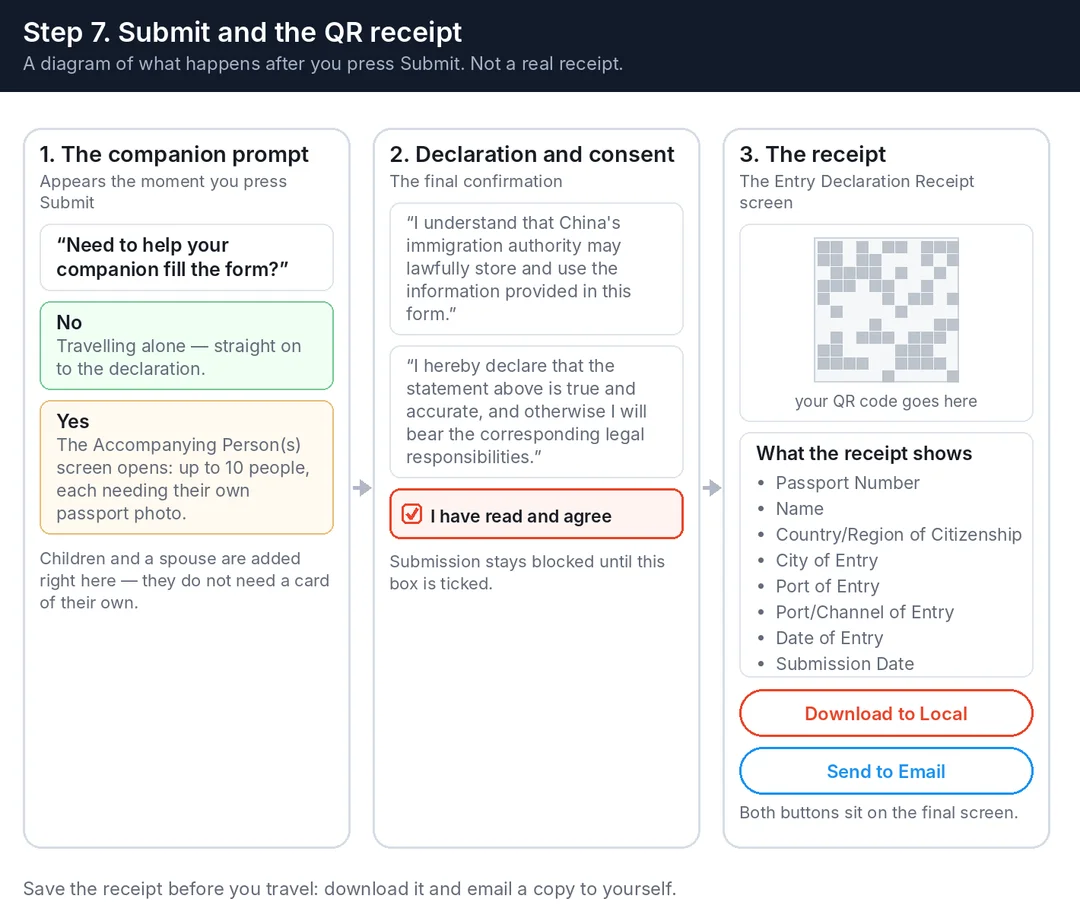
Pressing Submit first asks whether you need to help a companion fill the form.
- No — straight to the declaration.
- Yes — the Accompanying Person(s) screen opens. Up to 10 people, each needing their own passport photo. Children and a spouse do not need a separate card — they are added here.
Then comes the declaration, confirmed with a checkbox:
"I understand that China's immigration authority may lawfully store and use the information provided in this form. I hereby declare that the statement above is true and accurate, and otherwise I will bear the corresponding legal responsibilities."
That is not boilerplate: the rules screen states plainly that omission, concealment or false information can get you refused entry or transit.
After submission the Entry Declaration Receipt appears with a QR code and your details: passport number, name, country/region of citizenship, city of entry, port of entry, port/channel of entry, date of entry and submission date.
Two buttons: Download to Local and Send to Email. Use both — there may be no connectivity at the border. It helps to set up mobile data before you fly: see China eSIM: how to buy, install and set up mobile data.
The main fields in one table
| Screen | Field | Required | What to put in |
|---|---|---|---|
| Upload | Type of ID Document | Yes | Ordinary Passport |
| Upload | ID document page photo | Yes | jpg / png, up to 100 KB |
| Basic Information | Last Name | Yes | As in the passport, upper case |
| Basic Information | First Name | No | Given name only |
| Basic Information | Gender | Yes | Male / Female |
| Basic Information | Date of Birth | Yes | Year, month, day on three wheels |
| Basic Information | Country/Region of Citizenship | Yes | Citizenship, English name |
| Basic Information | Passport Number | Yes | No spaces |
| Basic Information | Entry Transportation Mode | Yes | Vessel / Flight / Train / Automobile / On Foot / Automobile and On Foot |
| Basic Information | Arrival Flight/Train/Vessel Number | Yes, if you arrive by air | The leg that crosses the border |
| Basic Information | City of Entry | Yes | Where you clear passport control |
| Basic Information | Port of Entry | Yes | The specific airport or crossing |
| Personal Information | Chinese Name | No | Leave empty |
| Personal Information | Country/Region of Birth | Yes | Country from the list + city in Latin letters |
| Personal Information | Contact Number | Yes | Digits, with country code |
| Personal Information | No | Where the receipt is sent | |
| Personal Information | Valid visa or entry permit? | Yes | Yes / No |
| Personal Information | Visa Number | If you have a visa | Up to 18 characters |
| Personal Information | Entry Policy Selection | If you have no visa | From what the service offers |
| Travel Information | Purpose of Entry | Yes | One of twelve |
| Travel Information | Date of Entry | Yes | Within the next 3 months |
| Travel Information | Destination Cities in China | Yes | Where you will spend the most time |
| Travel Information | Cities of Transit in China | No | Only if you stop elsewhere on the way |
| Travel Information | Address in China | Yes | Region + full address in Latin letters |
| Travel Information | Inviting entity or inviter | Yes | Yes / No |
| Travel Information | Confirmed Departure Itinerary | Yes | Yes opens the departure fields |
Worked examples
The data is fictional — it shows the format, not real people.
Holiday from the UK, London → Beijing, visa-free
| Field | Value |
|---|---|
| Last / First Name | SMITH / JOHN |
| Country/Region of Citizenship | the United Kingdom(GBR) |
| Passport Number | 512345678 |
| Transportation mode / flight | Flight / CA938 |
| City and port of entry | Beijing / Beijing Capital International Airport |
| Country and city of birth | the United Kingdom(GBR) / LONDON |
| Visa | No → Entry Policy: Visa-free Entry |
| Purpose / date of entry | Sightseeing/Leisure · 20260915 |
| Address in China | Beijing · Wangfujing Street 1, Dongcheng District, Beijing |
Visa-free entry for UK passports is announced through 31 December 2026.
Business trip from Germany, Frankfurt → Shanghai
| Field | Value |
|---|---|
| Country/Region of Citizenship | Germany(DEU) |
| City and port of entry | Shanghai / Pudong |
| Purpose of Entry | Conference/Business |
| Inviting party | Yes → company name and its phone number |
| Address in China | Shanghai · the hotel's full street address |
Visiting friends from Japan, Tokyo → Guangzhou
| Field | Value |
|---|---|
| Country/Region of Citizenship | Japan(JPN) |
| City and port of entry | Guangzhou / Baiyun |
| Purpose of Entry | Visiting Friends/Relatives |
| Address in China | Guangdong · your hosts' home address in Latin letters |
Travelling on a visa, for example from the United States
| Field | Value |
|---|---|
| Country/Region of Citizenship | United States of America(USA) |
| Valid visa or entry permit? | Yes |
| Visa Number | As printed on the visa sticker, up to 18 characters |
| Entry Policy Selection | Does not appear — it is only for travellers without a visa |
Transit through China with a stopover
| Field | Value |
|---|---|
| Purpose of Entry | Transit |
| Entry Policy Selection | 24-hour or 240-hour Temporary Entry for Transit |
| Cities of Transit in China | Your stopover city |
| Confirmed Departure Itinerary | Yes — you will need the departure date, flight, city and port |
If you never leave the transit area within 24 hours, you do not need the card at all (exemption 3).
Do you need a visa?
The answer you can trust comes from the form itself: Entry Policy Selection only shows the schemes your passport is eligible for.
The broad picture as of late August 2026, from public summaries rather than a per-country official document:
| Scheme | Who | For how long |
|---|---|---|
| Unilateral visa-free | Ordinary passports of around 50 countries, including much of Europe, the UK, Canada, Australia, New Zealand, Japan, South Korea and Brazil | 30 days per entry; announced through 31 December 2026 for most countries, with extensions being issued |
| Bilateral visa-free | Ordinary Russian passports, under the mutual arrangement in force since 15 September 2025 | 30 days per entry; extended to 31 December 2027 |
| 240-hour transit | Citizens of 57 countries, through 65 designated ports (as of 20 August 2026) | Up to 10 days, within permitted areas, departing from a designated port |
| 24-hour direct transit | Practically all travellers | 24 hours, staying in the city of arrival |
Terms change and visa-free entry normally does not cover study, employment or journalism. Check with a Chinese embassy or consulate before you book.
If your permitted stay is ending and you need a new visa, see our guide How to apply for a Chinese visa in Hong Kong.
Common mistakes
- The passport photo is over 100 KB. The most common technical reason people abandon the form. Compress it first.
- Not pressing Confirm on a wheel. The value looks selected but never reaches the field.
- A typo in the passport number or date of birth. Copy them from the document, not from memory.
- Middle names in the First Name field. Use what the passport's name fields actually say.
- Confusing city of entry with destination. Entry is where passport control happens.
- The wrong airport. Beijing, Shanghai and Guangzhou each have several.
- The wrong flight on a connection. You need the leg that crosses the Chinese border.
- Only the hotel name in the address. Street, building number and district are expected.
- Not saving the receipt. Download it and email it to yourself.
- Filling it in on a paid third-party site. The service is free.
If you didn't fill it in before you flew
Nothing is lost. At the border crossing you can:
- scan the QR code and fill the form in on your phone on the spot;
- use a self-service terminal in the inspection area;
- fill in a paper Arrival Card.
The only difference is comfort: after a long flight it is much easier to fumble a passport number or an address.
FAQ
Do I need to print the receipt? There is no official requirement to print it — showing the QR code on your phone is enough. A printout is a reasonable backup.
One card per family or per person? One declaration per person, but companions — children included — can be added to yours on the Accompanying Person(s) screen, up to 10 people.
Does the card replace a visa? No. It is a separate formality. A visa, if you need one, is obtained separately.
How long does a submitted card stay valid? No expiry has been announced for the receipt. The practical limit is set by the form itself: the date of entry can only be chosen within the next three months. Filling it in a few days before departure is plenty.
Can I correct my data after submitting? There is no edit button on the receipt screen. If you got something wrong, fill the form in again with the correct data.
Does it cost anything? No.
What people get wrong
- "The card expires after 24 hours." No such limit appears in the official launch notices, and the form lets you set an entry date three months ahead. The 24-hour figure belongs to something else — the visa-free transit scheme.
- "You need a separate card for a child." Children are added as accompanying persons on the adult's declaration.
- "The hotel name is enough for the address." The field is Address in China and expects a street and building number.
- "You have to pay an agency." Filing is free on the official site.
Sources
- Official NIA service, phone version: https://s.nia.gov.cn/ArrivalCardFillingPhone/
- Official NIA service, desktop version: https://s.nia.gov.cn/ArrivalCardFillingPC/
- NIA notice on online arrival card filing from 20 November 2025 (primary source) — https://en.nia.gov.cn/n147413/c187308/content.html
- NIA — warning about fake paid websites — https://s.nia.gov.cn/mps/zcjd/202507/t20250750_1010.html
- Chinese embassy guidelines for completing the arrival card online — https://bb.china-embassy.gov.cn/eng/lsyws/202511/t20251128_11762211.htm
- Summary of China's visa-free and transit policies — https://www.china-briefing.com/news/china-visa-free-travel-policies-complete-guide/
Field labels, rule texts and option lists are quoted from the English localisation of the NIA service itself.